

Digital Asset Management
DAM API
Build integrations that sync, transform, and optimize your media

I have worked with many DAM APIs, and Acquia DAM's Apiary site gives much clearer examples and information...Not only is the documentation better, but the API responses are faster
Sean O'Kelley | Founder, The DAM Consultants

It’s Possible With The API
Integrate Acquia DAM with any platform to connect assets and data for better digital experiences. Simply make assets searchable within other tools or power personalized content across channels.
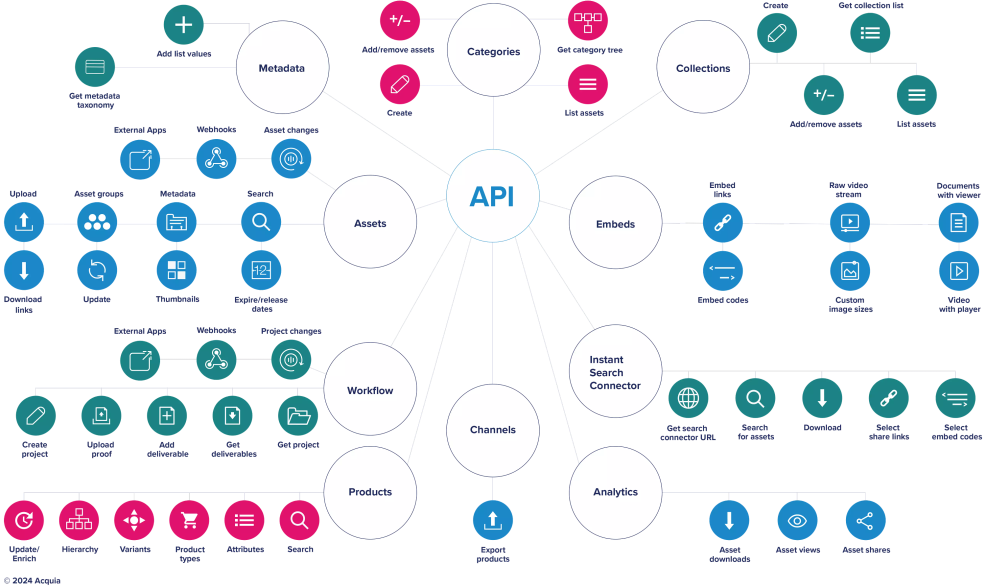
What a DAM API Can Do
Headless
Create customized, branded, and focused user experiences powered by your DAM assets and the API
Augmented reality
Help customers visualize products in their home by creating an augmented reality (AR) app using product assets stored in the DAM system
Sales enablement
Show up-to-date literature at tradeshows by populating sales enablement apps with assets managed in the DAM system
E-commerce
Keep digital marketplaces up to date with the latest product images and metadata from DAM
Syndication
Publish podcast content via Google, Spotify, iTunes, and more from the DAM system
Websites
Publish images, videos, and documents on your website while managing digital rights in the DAM system
Access Assets From Within the Tools You Use
Use our API endpoint, Instant Search Connector, to search for and share your assets in other tools while maintaining one source of truth in the Acquia DAM (Widen). The embeddable UI of instant search creates a seamless experience for your users.

Go Real-time with Webhooks
Establish real-time communications between your DAM and other systems. Use webhooks to perform actions based on asset lifecycle events within the DAM system, like upon creation, update, or deletion.
- Get notified as changes happen in your DAM system for time sensitive workflows
- Build efficient integrations by eliminating the need for polling or constantly checking for updates in the DAM system
- Customize your integrations by defining what events trigger notifications
Recommended content


Build Faster With the DAM SDK
Create scripts, programs, and integrations more efficiently with the open-source SDK. Powered by Typescript’s type safety features and leveraging code editors’ autocomplete, suggestions, and tooltips, the SDK provides a smooth developer experience.
- Faster, Easier Development: Build integrations and scripts without manually handling every API detail
- Fewer Errors and More Reliable Code: Typescript’s type safety and SDK guidance help catch mistakes early, resulting in more stable integrations
- Open Source Flexibility: Customize, extend, and contribute to the SDK to fit your specific needs
Recommended content
Introducing the Acquia DAM SDK for Javascript and Typescript
Benefits of Our DAM API
- Publish the latest version of assets and product information across websites, sales enablement tools, e-commerce sites, and more
- Minimize the risk of content rights and usage violations by extending the governance controls of the DAM solution into other systems
- Import data to centralize and organize assets in one system
- Test new API behavior before it’s the default using early access toggles
Recommended content

We built elaborate systems around the DAM solution, leveraging Widen’s [Acquia DAM’s] API to create a photo management workflow. Widen’s [Acquia’s] product is core to our current ecosystem.
| What is a DAM API and what can developers build with it? |
|---|
|
A DAM API (Application Programming Interface) allows developers to programmatically access and interact with a digital asset management system — uploading assets, retrieving metadata, triggering workflows, searching the library, and embedding assets into external applications. Acquia DAM's open REST API enables custom integrations with virtually any system: ecommerce platforms, PIM systems, custom web apps, mobile apps, or internal tools. This gives developers full flexibility to extend the DAM's capabilities beyond the native UI.
|
| How does the Acquia DAM API work and what authentication does it use? |
|---|
|
Acquia DAM's REST API uses OAuth 2.0 for secure authentication and follows standard RESTful conventions for resources like assets, collections, portals, and metadata schemas. Developers receive detailed API documentation covering all endpoints, request formats, response objects, and code examples. The API supports operations for asset CRUD (create, read, update, delete), metadata management, workflow triggers, and reporting — enabling full programmatic control over your DAM environment.
|
| What are common use cases for integrating with the Acquia DAM API? |
|---|
|
Common DAM API use cases include syncing approved assets automatically to a website or ecommerce platform, building a custom asset picker within an internal tool, triggering ingestion workflows when assets arrive from external sources (like a photography studio or agency), pushing asset usage data into analytics dashboards, and connecting DAM to a PIM system so product images and specs are always in sync. Any workflow that requires moving or acting on digital assets programmatically benefits from the DAM API.
|
| Does Acquia DAM offer pre-built connectors in addition to the API? |
|---|
|
Yes — beyond the open REST API, Acquia DAM provides 80+ pre-built integrations with popular platforms including Adobe Creative Cloud, Drupal, Shopify, HubSpot, Workfront, Slack, Salesforce, and more. These connectors are plug-and-play, requiring minimal configuration compared to building a custom API integration. For organizations that need a tailored connection not covered by existing connectors, the API and 200+ marketplace partners make virtually any integration achievable.
|
| How can I access Acquia DAM API documentation? |
|---|
|
Acquia DAM API documentation is available to licensed customers and developers through the Acquia developer portal, providing full reference documentation for all API endpoints, authentication setup, code libraries, and usage examples. Prospective customers can request API documentation access during the sales and demo process to evaluate the technical capabilities before committing. The Acquia developer community and support team are also available to assist with integration questions and custom implementation guidance.
|