



Build Better Drupal apps
A Drupal-optimized hosting platform built to empower your team.






Experience Digital Freedom™
Others label it hosting, but we know you need more than that. Acquia Cloud Platform is built for maximum Drupal performance and fully managed by our team.


IT Architecture
Pride in Performance
Uptime and performance are the highest priority. Built for Drupal and fully managed by Acquia, your apps are backed with up to a 99.99% Uptime SLA.*

Digital Security
Security Your Customers Expect
Access servers securely with SSH, scan all file uploads through ClamAV modules, and a robust compliance portfolio is available with FedRAMP Authorized, PCI, HIPAA, and more. Finally, we’ve got world class support for Drupal available 24/7/365.

Digital Marketing
Low-Code Tools for Anyone
Manage everything from a central location. Assign roles and permissions to team members to keep tabs on who can do what. Create custom dashboards to manage sites and push updates across multiple web properties.

Development
Dev Tools Tailored to Drupal
Designed with Drupal in mind, Cloud IDE and Code Studio give developers everything they need to build and deploy dazzling digital experiences.
Acquia Named a Leader in Digital Experience by G2
Acquia Cloud Platform Has Endless Benefits

Modern Infrastructure
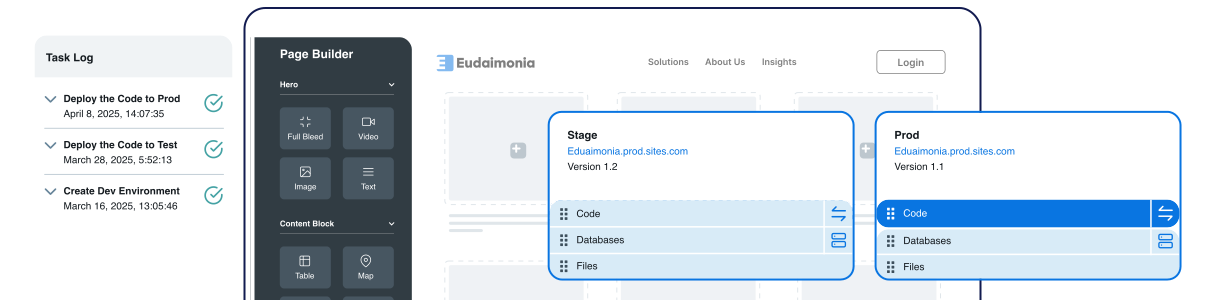
Establish web applications that include development, staging, production environment, CI/CD, and monitoring.

Scale Confidently
Develop an infrastructure that meets your growth, traffic, and performance demands.

Monitor Web Effectiveness
Meet your organizational goals and identify opportunities for improvement.

Minimize Risk
Reduce the possibility of security and compliance incidents.

Develop Digital Strategies
Deliver outstanding experiences across touchpoints and keep pace with technological advancements and security needs.

Composable Architecture
Create operational efficiencies through continuous technology and infrastructure refinements.

Launch Websites Faster
Use a drag-and-drop interface to build pages with reusable components and templates.

Consolidate and Optimize
Enhance your web application infrastructure to reduce costs.

Consistent Brand Content
Define predetermined colors, fonts, and styles to keep content uniform throughout your digital properties.

Single Source of Truth
Plan, create, test, and deploy your apps from one spot.

Drag and Drop Interface
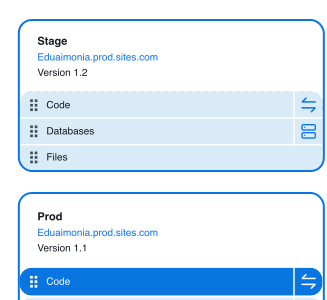
An end-to-end platform with development, staging, and production environments.

Integrate With What You Need
GitHub, Bitbucket, and a smattering of others are included in Acquia’s BLT tool.

"From an infrastructure standpoint, Acquia [Digital Experience Platform] allows for the scaling during extreme traffic increases fairly seamlessly."
Director in Engineering
Marketing & Advertising Company
| What is Acquia Cloud Platform and what makes it different from regular web hosting? |
|---|
|
Acquia Cloud Platform is an enterprise-grade Drupal-optimized cloud hosting and development platform that provides automated deployments, built-in security, global CDN, and developer tools — all pre-configured for Drupal applications. Unlike generic cloud providers, it comes with Drupal-specific features like automated codebase management, Cloud IDE, code pipelines, and Acquia Search (powered by Solr) out of the box. It eliminates the overhead of managing infrastructure so teams can focus on building great digital experiences.
|
| How does Acquia Cloud Platform handle security and compliance? |
|---|
|
Acquia Cloud Platform is built with enterprise security at its core, offering FedRAMP Authorization, ISO 27001 certification, SOC 2 Type II compliance, and GDPR-ready infrastructure. The platform provides automated SSL certificates, 24/7 intrusion detection, DDoS protection, web application firewall (WAF), and regular security patching managed by Acquia's security team. Organizations in regulated industries like government, healthcare, and finance rely on Acquia for mission-critical Drupal hosting.
|
| What developer tools are included with Acquia Cloud Platform? |
|---|
|
Acquia Cloud Platform includes Cloud IDE (a browser-based development environment), Code Studio (CI/CD pipelines built on GitLab), Acquia CLI, automated deployment pipelines, multi-environment staging (dev/stage/prod), and Site Studio for low-code page building. Developers get professional-grade tools without the complexity of configuring them from scratch. These tools integrate directly with your Drupal codebase for a seamless development-to-deployment workflow.
|
| How does Acquia Cloud Platform pricing work? |
|---|
|
Acquia Cloud Platform pricing is based on the scale of your deployment — including the number of sites, traffic volumes, storage requirements, and the features and support tiers you need. Plans range from Professional to Business to Elite levels for organizations of different sizes. Custom enterprise pricing is available, and Acquia offers a free demo to help you find the right plan for your Drupal hosting needs.
|
| Can Acquia Cloud Platform host multiple Drupal sites? |
|---|
|
Yes — Acquia Cloud Platform supports multi-site hosting at scale, and for organizations managing large portfolios of websites, Acquia Site Factory offers a dedicated multi-site management platform. Site Factory enables centralized governance, automated updates, and templated site provisioning for organizations running dozens or hundreds of Drupal sites. Both options allow organizations to manage their entire Drupal estate from a single control plane.
|