


Senior Product Marketing Manager Product Marketing Acquia
The AI Co-Admin Your DAM Needs
Why DAM admins need an AI coworker, not just an AI tool
If you manage a DAM, your job description probably doesn't reflect the breadth of your job. While larger companies may have the luxury of a full-time DAM administrator, smaller companies don’t. In an SMB, handling the DAM is likely just one item in a long list of your responsibilities. And that means you need every advantage you can get.
AI for DAM administrators has real practical value; tools like ChatGPT, Claude, and Gemini can take work off your plate. But if you don’t have an approach for where to start or how to prompt them effectively, you may be getting generic answers to specific problems.
What is the CRIT framework?
Developed by Geoff Woods in The AI-Driven Leader, the CRIT framework is a four-part prompting method that turns a vague AI request into a productive working session. Instead of asking a generic question and getting a generic answer, you give the AI everything it needs to act like a subject-matter expert on your specific problem.
CRIT stands for:

4 ways DAM admins can use AI prompts today
These are four use cases we've seen work well for Acquia DAM administrators
Driving DAM adoption
Low adoption is one of the most frustrating DAM problems, and the admin usually takes the blame for it. Sales teams revert to local folders. Regional offices pull old assets off their desktops. And agency partners often decide to work around the system entirely.
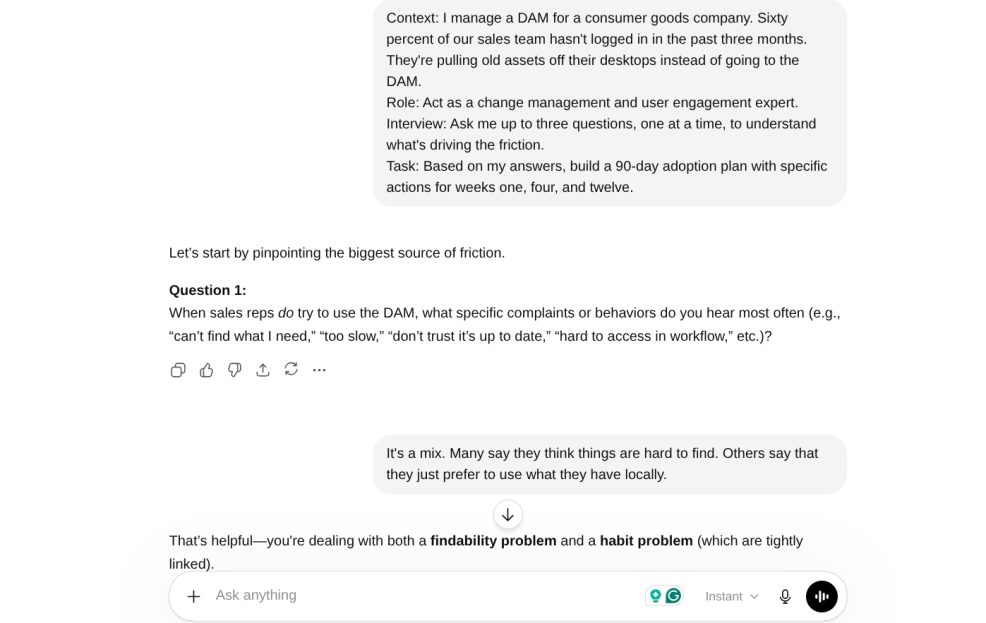
A CRIT prompt doesn't solve adoption on its own, but it gets you a starting point you don't have to build DAM adoption strategies from scratch. Here's what that looks like in ChatGPT:
Context: I manage a DAM for a consumer goods company. Sixty percent of our sales team hasn't logged in in the past three months. They're pulling old assets off their desktops instead of going to the DAM. Role: Act as a change management and user engagement expert. Interview: Ask me up to three questions, one at a time, to understand what's driving the friction. Task: Based on my answers, build a 90-day adoption plan with specific actions for weeks one, four, and twelve.
|
The AI will ask about your current training process, what users say when you follow up, and whether leadership has signaled any urgency around adoption. Answer as specifically as you can. When you're done, you have a structured 90-day plan you didn't have to build from memory, with actions tailored to your actual situation, not a generic rollout template.
Cleaning up DAM metadata
Metadata schemas accumulate. You add fields for edge cases, vocabulary terms drift, and search gets noisy. You know it needs a cleanup; it just never rises to the top of the list.
But AI can really help with DAM metadata strategy and cleanup. You can export your current field list directly from the DAM and paste it into the prompt. The AI's critique is specific because your input is specific.
Context: I manage a DAM for a [industry] company. Our users say search results are noisy. I think our metadata schema is too bloated. Here's our current field list: [paste export]. Role: Act as a UX information architect. Interview: Ask me three questions, one at a time, to understand how different user groups search and what they actually need to find. Task: Critique the field list and suggest an "Essential 5" set that would simplify the user experience without losing critical functionality. |
The same approach works for naming convention audits, dashboard design by user role, and global versus local branding governance. The pattern is consistent: give the AI your real data, assign it the right expert persona, and let it ask a few questions before it runs.
Translating analytics into executive language
Most DAM admins have Insights data. But far fewer have a clean way to turn that data into the language executives actually respond to, e.g., speed to market, brand consistency, and content ROI.
DAM ROI executive reporting is a skill set that sits outside most admins' wheelhouse, and it's also where AI is genuinely strong. The key is feeding it real numbers rather than asking it to speculate.
Context: I need to justify the time I spend on the DAM to my [CMO / VP of Marketing]. Here are 12 months of Insights report data: [paste CSV export]. Role: Act as a business analyst. Interview: Ask me three questions, one at a time, about the business context and what outcomes matter most to my leadership. Task: Write a four-sentence executive impact statement that connects DAM growth to speed-to-market and brand consistency. |
You can further strengthen the output by including ROI inputs alongside the Insights data:
- Time saved on search (searches performed × minutes saved × hourly rate)
- Time saved on fulfillment (downloads × minutes saved × hourly rate)
- Asset reuse cost avoided (total downloads minus unique assets × creation time × designer rate)
The more specific your inputs are, the more credible the statement becomes.

Building a custom DAM co-admin system prompt
The limitation of one-off prompts is that every new conversation starts from zero. You have to re-explain your company, your library size, your integrations, and your biggest problems before you can get to the actual question.
To fix this, you need a custom system prompt: a block of context you paste at the start of any conversation that gives the AI a persistent, accurate picture of your environment before you ask it anything. Think of it as a standing briefing: your DAM platform, your user base, your most common DAM governance challenges, and how you want the AI to respond to you as a practitioner.
When you build this once and reuse it, the AI stops being a blank-slate chatbot you have to re-explain everything to. It becomes a co-worker who already knows the setup.
The job is only getting more complex
New AI tools, expanding governance requirements, and more channels to manage all mean that the DAM admin's workload isn't going to shrink. And the admins who figure out how to use AI as a co-worker, not just a search tool or a shortcut, will be the ones who can keep up.
The prompts below are a starting point. The habit of reaching for a CRIT-structured prompt before you try to solve a DAM problem solo is the longer-term shift.
Download your DAM Admin AI Starter Kit
Ready to start working with AI as your co-admin? Download the DAM Admin's AI Prompt Cheat Sheet for a quick-reference guide to the most useful prompts for your day-to-day workflow, and grab the DAM Co-Admin System Prompt to set up a custom AI assistant trained specifically for DAM management tasks. No forms or gates; just download and use.


