


Senior Product Marketing Manager, Drupal Acquia
Collection
Why Drupal Is the Best CMS for AI
Collection :
AI features are on every roadmap now, but most CMS platforms weren't built to support them. The model your team picked six months ago may not be the one you want next quarter. Your content was built for people to read, and agents struggle to query it. And every AI integration adds another governance question you have to answer before anything goes live.
AI is now the top reason developers would leave a CMS. In Acquia-commissioned research of 575 developers, 53% said a platform that doesn't work well with AI would prompt them to switch.
The best CMS for AI does four things. It lets you switch models without rebuilding, works with the AI tools your teams already use, structures content so agents can find and use it, and lets you govern and monitor everything AI does. Drupal has been structuring content for more than a decade, so the foundation AI agents need is already in place. Platforms built around pages are now scrambling to retrofit theirs.
Here’s how Drupal handles model switching, content structure, and more.
Can you switch AI models in Drupal without rebuilding?
Yes. Drupal treats AI providers as interchangeable, so switching models is a simple configuration change; your content workflows stay the same.
Many CMS platforms tie their AI features to a specific model or vendor. That means when that model has an outage, raises prices, or gets outpaced by a competitor, you're stuck. Drupal takes a different approach: it puts an abstraction layer between your workflows and the model. Your workflows call Drupal's AI layer, and the AI layer calls whichever provider you've configured, whether that's OpenAI, Anthropic's Claude, or an open-source model you host yourself.
Each provider installs as its own module, and you set a default provider and model for each operation type. Here’s roughly what that looks like:
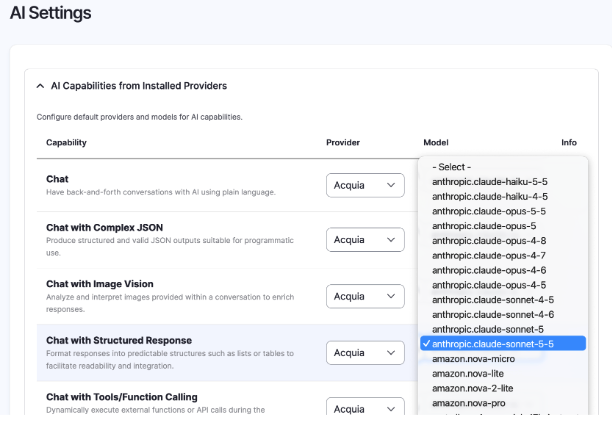
CAPTION: Map each capability to the model that’s best suited to deliver the results you require.
Swap anthropic for openai or a self-hosted provider, and every workflow that uses chat follows. Nothing downstream has to change. Across dozens of supported providers, you can choose from thousands of models, so you can use the best model for each task as the landscape keeps shifting, with no code changes needed.
Can Drupal connect to the AI tools you already use?
Yes. Drupal can act as a Model Context Protocol (MCP) server, so any MCP-compatible AI platform can connect to it.
Most organizations use more than one AI tool. Developers work in coding assistants like Claude Code or Cursor, other teams use their own assistants, and new agents keep arriving. With Drupal's MCP Server module, any assistant or agent can query or update your Drupal site from wherever your team already works, as long as they have the right credentials. Access runs through OAuth 2.1, so each connection gets only the permissions it's been granted.
You can also expose new, custom tools through configuration instead of code, using visual tools to map out custom business logic. Any Drupal tool can be turned into an MCP tool from the admin interface, so your AI platforms can do more with your site as your needs grow.
How does Drupal structure content for AI agents and RAG?
Drupal stores content as structured, typed data rather than flat HTML. For years, that gave Drupal a distinct advantage in reusing the same content across platforms: web pages, native mobile apps, wearables, digital signage, and more. Today, it means that AI agents can query the exact pieces they need, and retrieval-augmented generation (RAG) has clean inputs to work with.
Page-based platforms store content as a blob of formatted text. For an AI system to use it, it has to scrape the page and then guess which part is the product name, which is the price, and which is the disclaimer. Drupal, however, stores content as structured data from the start:
- Entity types and bundles: Define what a piece of content is, such as an article, a product, an event, or a location.
- Fields: Break each item into typed, named parts, such as a title, a summary, a date, a reference to another entity, or a taxonomy term.
- Relationships: Make connections between entities explicit so that an agent can follow a product to its specs, its support docs, and its related products.
- APIs: Make all of this structured content available to other systems. JSON:API ships in Drupal core, and GraphQL is available as a contributed module, so agents and applications can request structured content directly.
For RAG, that structure pays off twice. Content can be indexed and embedded at the field level rather than the page level, and Drupal's AI Search module connects to vector databases such as Milvus, Pinecone, and Postgres to power semantic retrieval. Retrieval gets more precise, and answers stay grounded in the content you meant to use.
And it works both ways. AI agents can also create content in Drupal. AI Automators can fill in fields as content is created, such as generating a summary, tagging a page, or writing alt text for images. Drupal's AI agents can go further and set up new content types and fields on request. Everything an agent creates is stored in the same structured model as the content your team creates, so it's just as queryable and it goes through the same review workflow before it's published.
The developers we surveyed see where this is heading. Fifty-one percent rank structuring content so AI agents can reliably find, query, and act on it among their top three development priorities, and 47% say the same about building experiences that work equally well for people and agents.
One repository, every channel
Drupal serves content from a single repository to web, mobile, voice interfaces, and AI agents at the same time. Because content lives as structured data behind APIs, the channel is just another consumer. Your website, app, voice assistant, or AI agent answering customer questions can all draw on the same source of truth. You can update a product spec once, and every channel reflects it, which also means AI agents aren't answering from stale copies of your content.
How does Drupal govern and monitor AI?
Drupal gives you control at every stage: checks on each AI request, human review before anything goes live, and full visibility into what your AI is doing and what it costs.
Keeping a human in the loop
Flexibility also needs guardrails, so AI output doesn't go live unchecked. Drupal's content moderation workflows let you define states such as draft, in review, and published, so AI-suggested changes are held for human approval instead of being applied directly. Teams can build, test, and iterate on content in a governed environment before anything is pushed live.
Drupal AI 1.3.0 introduced AI Guardrails: configurable checks that run before or after any AI request. You define the rules once, and they apply wherever AI is used on your site.
Controlling cost and context
Drupal keeps costs down by matching each task to the smallest model that can handle it and giving each model only the context it needs.
Sending every request to the largest available model is expensive, and it doesn't guarantee better answers. Any model given loosely scoped context is more likely to wander. Drupal's Context Control Center manages context as granular elements, so each AI task receives only the brand rules, content, and instructions it needs.
It also routes work intelligently. Not every step needs AI. Predictable tasks, like validating required fields or checking formatting, can run on rules-based logic, which is instant, free, and gives the same result every time. Small, efficient models handle simpler reasoning, such as content classification, while heavy LLMs are reserved for complex generation. Acquia calls this approach using the “minimum viable model”: the smallest, most cost-effective model that can do the job reliably. Mixing deterministic logic with AI reasoning this way cuts costs, speeds things up, and improves reliability.
Here's what that may look like when an editor publishes a new product page. A small, fast model tags the page with the right taxonomy terms, pulls key specs into structured fields, and generates alt text for images. A larger model handles the one task that needs it: drafting the product summary. Then a small model checks that summary against your brand rules before it goes to a human for review.
In other words, publishing one product page involves four AI tasks, and only one needs the expensive model. The result is lower token spend, less room for hallucination, and AI behavior that's easier to predict and debug.
Drupal’s AI features also get a boost from the thousands of free modules available on drupal.org. The AI Metering module, for example, tracks AI token use by team and use case. Teams can review the data in built-in dashboards and enforce monthly quotas by user or role, so people can use the models best suited to their work without the risk of sticker shock at the end of the month.
Seeing what your AI is doing
Drupal AI's observability module exports spans, traces, and metrics through OpenTelemetry, the industry standard for application monitoring. You can connect that data to platforms like Datadog, Grafana, or Sentry to monitor AI agent decisions, track usage and cost, and audit AI interactions across your sites.
That matters to the 44% of developers who rank governance over what AI agents can and can't do with their content among their top three development priorities.
Can AI build on-brand pages in Drupal?
Yes. AI builds pages from your approved components, so your brand rules come built in.
When marketing teams use AI platforms to generate content or pages, developers end up cleaning up the results: off-brand colors, the wrong fonts, or layouts that break the design system.
Drupal avoids that by having AI build from components your team has already approved, such as heroes, cards, and calls to action, each with your design tokens, fonts, and spacing rules already baked in. When someone asks Drupal Canvas's AI assistant to build a page, it assembles that page from your library instead of generating raw HTML from scratch. Your components set the brand guardrails, and you control the components.
Getting the content inside those components right depends on context. The Context Control Center can automatically supply what a model needs, such as a brand messaging guide, notes on the site’s design system, or a company profile, so it doesn’t have to guess.
Built for the agentic web
Enterprise CMS vendors are now racing to add what Drupal has offered for more than a decade: the ability to structure content so AI can use it.
Edrington shows what happens when AI does the build work and people keep the final say. The spirits company behind brands like Casa Brugal and The Macallan had a stalled WordPress migration. Rebuilding by hand would have meant months of developer time and design compromises the brand didn't want to make.
Working with Acquia partner FreelyGive, Edrington took an AI-led approach on Acquia Source. Claude Code, connected to a Playwright MCP server, generated and functionally tested the site's components, and the team then reviewed them before bringing them into Drupal Canvas. The migration shipped, including compliance features like a persistent age gate, and more Edrington brands are now lined up to follow.
AI will keep changing. New models will keep arriving, and the tools your teams use will keep multiplying. Drupal is built for that: you can switch models without rebuilding, connect any AI harness through MCP, give agents structured content they can rely on, and govern and monitor everything AI does. And through the Drupal AI Initiative, the community and its partners keep investing in what comes next.
The best way to judge whether Drupal fits your organization’s needs? Try it for yourself.
Keep reading: Reasons Not to Use Drupal: Debunking 5 Common Myths


